Short answer
Both are free Windows disk space analyzers built around a treemap. SpaceSniffer, from Uderzo Software, is portable freeware whose treemap you explore by zooming into blocks. WinDirStat is open-source GPL-2.0 software with a folder tree and a file-type list next to its treemap, plus Largest Files, duplicate detection, cleanup tools and updates through winget. Pick WinDirStat when you also want to act on what you find.
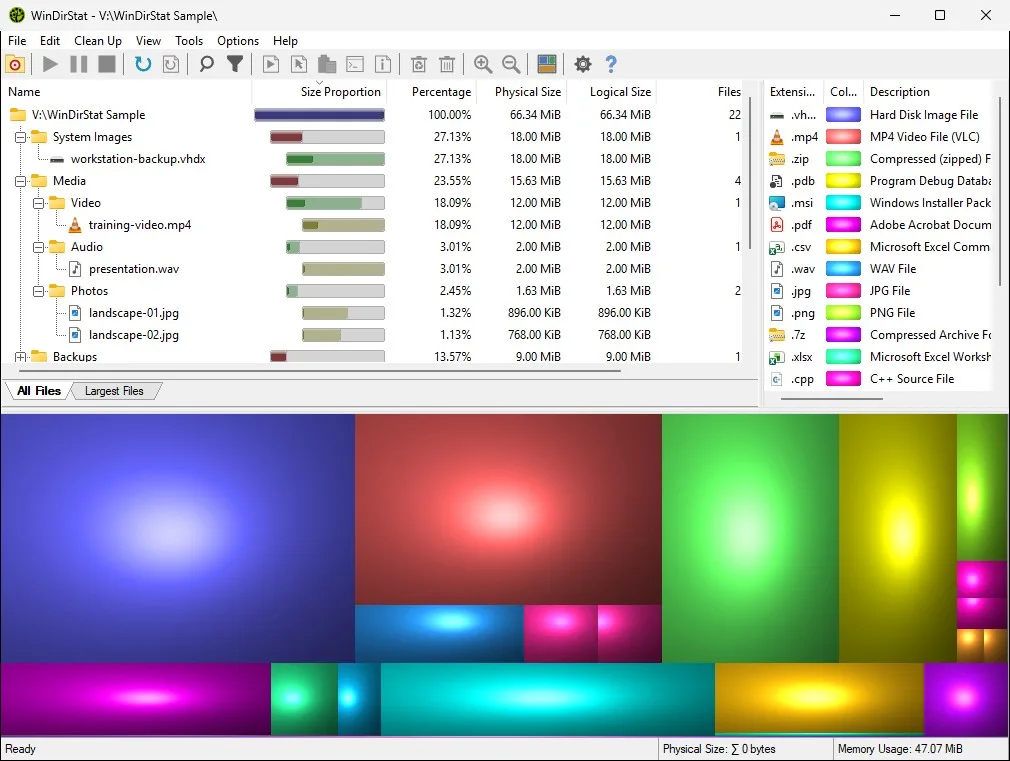
How do I choose between WinDirStat and SpaceSniffer?
- Decide if you need open source. WinDirStat's code is public under GPL-2.0; SpaceSniffer is freeware, and its product page offers no source code.
- Decide how you want to install. SpaceSniffer runs as a portable program; WinDirStat offers an MSI, winget and a portable zip.
- List what you will do after the scan. Finding duplicates, listing the largest files and running cleanup tools are built into WinDirStat.
- Scan the same folder in both. Point each at one folder and keep the one whose view you read faster.
How are WinDirStat and SpaceSniffer different?
They share the treemap idea and differ in almost everything around it. SpaceSniffer is a single portable program built around a treemap of the drive you pick, which Uderzo describes as a way to see at once where big folders and files are. WinDirStat splits its window into a folder tree with sizes and percentages, a file-type list and the treemap, and all three stay in sync: select a rectangle and the tree jumps to that file. That makes WinDirStat better for lists and precise actions, while SpaceSniffer keeps to the map alone.
Which one finds duplicates and large files?
WinDirStat does both. Its Largest Files tab lists the 50 biggest files in the scan by default, and its duplicate scan, off until you tick it in the Select Drives dialog, groups identical files by size and content hash. The SpaceSniffer product page does not list either feature. For step-by-step use, see find large files and find duplicate files.
Which is easier to keep up to date?
WinDirStat, if you installed it with winget: winget upgrade -e --id WinDirStat.WinDirStat fetches the new MSI from GitHub and checks its hash, and the Microsoft Store version updates by itself. A portable copy of either program is updated by downloading the new version and replacing the old folder. Every WinDirStat release comes with a changelog on GitHub; for example version 2.9.0, which added scanning of phones and other MTP devices and recovery of deleted files on NTFS and exFAT.
Can I scan a network drive or phone with either?
WinDirStat scans local drives, individual folders, network paths and, since the same release, MTP portable devices such as phones connected over USB. Accelerated scanning only applies to local NTFS drives, so network shares are walked folder by folder. For a comparison with the other fast scanner people ask about, read WinDirStat vs WizTree. Checked against WinDirStat 2.9.0.
| WinDirStat | SpaceSniffer | |
|---|---|---|
| Maker | WinDirStat team | Uderzo Software |
| License | GPL-2.0 open source | Freeware, donations welcome |
| Install | winget, MSI, portable zip, Microsoft Store | Portable program |
| Main view | Folder tree, file-type list and treemap together | Zoomable treemap |
| Other views | Flame graph, sunburst, Largest Files | Treemap only |
| Duplicate files | Yes, by size and content hash | Not listed on the product page |
| Cleanup tools | Clean Up menu with Windows cleanup shortcuts | Not listed on the product page |
WinDirStat from its README and source at the checked tag; SpaceSniffer from the Uderzo product page, read 2026-09-27.
Frequently asked questions
Is SpaceSniffer open source like WinDirStat?
No. Uderzo describes SpaceSniffer as freeware, free to use with donations welcome, and its product page offers the program but no source code. WinDirStat's full source is on GitHub under the GNU GPL version 2.
Which treemap is easier to read, WinDirStat or SpaceSniffer?
Both draw nested blocks sized by disk use, so the biggest folders stand out in either. WinDirStat also colors each file by type and links every rectangle to the folder tree and the file-type list, which makes it easier to find one kind of file, such as videos, across the whole drive.