Short answer
Each WinDirStat release on GitHub carries three MSI installers, two portable archives, MSIX packages, a hashes file and debug symbols. For most PCs the right file is WinDirStat-x64.msi (2.3 MB); take the arm64 MSI on Windows on ARM and the x86 MSI on 32-bit Windows. WinDirStat.zip is the portable copy. The current release is release/v2.9.0, published September 26, 2026.
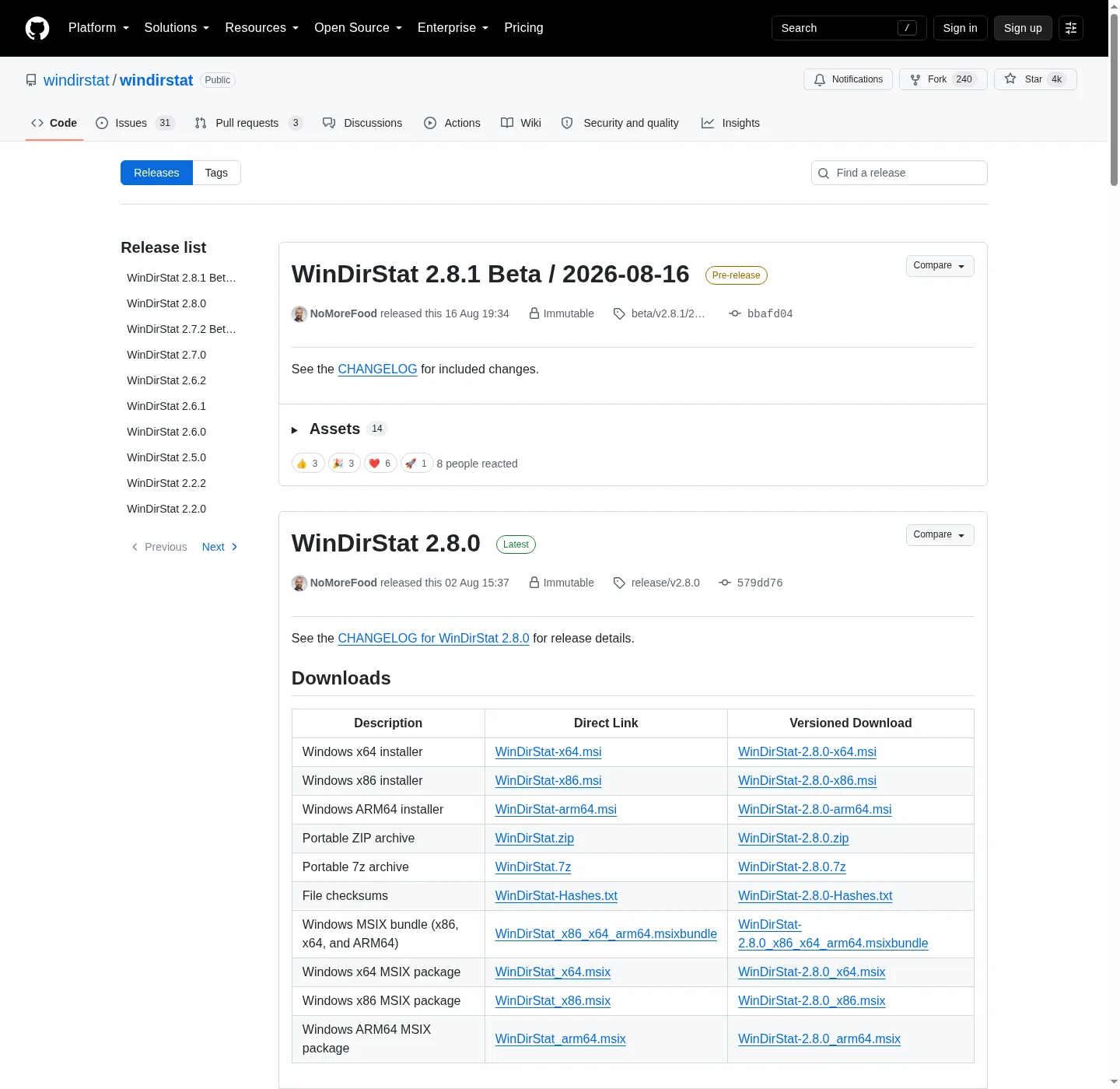
How do I get the right file from a WinDirStat release?
- Open the latest release. Go to github.com/windirstat/windirstat/releases; the release marked Latest is the current stable version.
- Skip the betas unless you want them. Pre-releases are tagged beta/v with a date; stable releases are tagged release/v.
- Expand Assets. Scroll to the Assets list under the release notes.
- Pick your file. Click WinDirStat-x64.msi for most PCs, or the file from the table that matches your CPU or setup.
- Check the hash. Compare the file with the SHA-256 shown next to it, or with WinDirStat-Hashes.txt on the same release.
How often does WinDirStat publish a release?
Since May 2026 WinDirStat has published a stable release roughly once a month, with beta builds in between. The release list below shows the most recent stable versions with their dates and download counts, and the changelog lists what changed in each one, with an anchor per version. Each stable release is announced on GitHub first; winget and the Microsoft Store follow once their own review passes, so for a day or more after a release only GitHub has the new files. This site's pages were last checked against WinDirStat 2.9.0.
Why are there three MSI files for WinDirStat?
Windows runs on three processor families, and each MSI carries a program built for one of them. x64 covers almost every desktop and laptop with an Intel or AMD processor. ARM64 covers Windows on ARM devices such as Snapdragon laptops, where an x64 program would run through emulation and more slowly. x86 exists for the few remaining 32-bit Windows installs. All three install the same features to the same place, Program Files\WinDirStat, and winget picks the right one by itself. If you are unsure which your PC is, the file chooser shows where Windows tells you.
What is in WinDirStat-Hashes.txt?
It is a plain text table produced when the release is built. For every file on the release it lists a SHA-256, a SHA-1 and an MD5 value, and its SHA-256 lines match the digests GitHub shows beside each asset. Open it in Notepad to compare with the output of Get-FileHash, as the safe download steps explain. It is not a program and does nothing if you try to open it with anything other than a text editor.
Which WinDirStat versions are recent?
The list below comes from the GitHub API and shows each recent stable release with its files and download counts. Counts cover GitHub downloads only, so they undercount the real number of installs.
Official releases
All releases on GitHub- GitHub stars
- 4,229
- Downloads, last 3 releases
- 2.6M
- Latest version
- 2.9.0
- WinDirStat-arm64.msi 2.2 MB 2.7k downloads
- WinDirStat-x64.msi 2.3 MB 239k downloads
- WinDirStat-x86.msi 2.2 MB 8.8k downloads
- WinDirStat.7z 2.3 MB 5.4k downloads
- WinDirStat.zip 3.4 MB 15k downloads
2.8.0
release/v2.8.0
- WinDirStat-arm64.msi 2.8 MB 17k downloads
- WinDirStat-x64.msi 2.8 MB 1.3M downloads
- WinDirStat-x86.msi 2.6 MB 40k downloads
- WinDirStat.7z 3.9 MB 20k downloads
- WinDirStat.zip 5.4 MB 85k downloads
2.7.0
release/v2.7.0
- WinDirStat-arm64.msi 2.7 MB 13k downloads
- WinDirStat-x64.msi 2.8 MB 707k downloads
- WinDirStat-x86.msi 2.6 MB 25k downloads
- WinDirStat.7z 3.6 MB 15k downloads
- WinDirStat.zip 5.4 MB 51k downloads
Counts come from the GitHub API and cover only GitHub downloads of the release/v* releases listed. Installs through winget, the Microsoft Store, Chocolatey and Scoop are not included.
| File | Size | What it is | Take it when |
|---|---|---|---|
| WinDirStat-x64.msi | 2.3 MB | 64-bit installer | Most Intel and AMD PCs; the README's default |
| WinDirStat-arm64.msi | 2.2 MB | ARM64 installer | Snapdragon laptops and other Windows on ARM |
| WinDirStat-x86.msi | 2.2 MB | 32-bit installer | 32-bit Windows only |
| WinDirStat.zip | 3.4 MB | Portable: x64, arm64 and x86 folders, one exe each | No install rights, or a USB copy |
| WinDirStat.7z | 2.3 MB | Same portable content, smaller | You already have 7-Zip |
WinDirStat_x86_x64_arm64.msixbundle | MSIX packages for all three CPUs | App Installer or managed MSIX deployment | |
WinDirStat-Hashes.txt | SHA-256, SHA-1 and MD5 of every file | Checking a download; never run it | |
WinDirStat-DebugSymbols.7z | Debug symbols | Only when a developer asks for them |
Asset list from the release/v2.9.0 release; sizes from the GitHub API, refreshed with each release. Descriptions from the WinDirStat README download table.
Frequently asked questions
What is the difference between WinDirStat release and beta tags?
Stable versions are tagged release/v followed by the version and are marked Latest on GitHub. Beta builds are published as pre-releases with tags such as beta/v and a date, so you can test fixes early. In winget, WinDirStat.WinDirStat follows the stable releases and the separate package WinDirStat.WinDirStat.Beta follows the betas.
Can I link straight to the newest WinDirStat MSI?
Yes. GitHub serves the newest stable file at github.com/windirstat/windirstat/releases/latest/download/WinDirStat-x64.msi, which is the link the README uses. The address never changes, so it always fetches the current release.